
 Home
Home  Check Fonts
 MICR Gauges
 Information
 Purchase
 Contact Us
MICR Check Position Gauges $49.95 / $39.95 / $29.95
For all U.S. & Canadian checks
Our MICR Mounted Plastic Check Position Gauge: ($49.95) is a clear plastic template glued to a solid white plastic backer board. The plastic backer board has indents to let you easily slide your checks in and out. Slide your check between the clear template and the plastic backer board to make your measurements.
Our MICR Mounted Check Position Gauge: ($39.95) is a clear plastic template glued to a card stock backer board. Just slide your check between the clear template and the backer board to make your measurements.
We also sell a MICR Film Check Position Gauge: ($29.95) which has no backer board. You move the film over and around your check to make all measurements.

Why use a MICR Check Position Gauge with the new 2024 updates? Using a MICR position gauge ensures that all the data on that check is accurately printed and in the correct positions. A MICR gauge is a clear template that you position over your check. It will indicate whether or not your MICR encoding follows the correct spacing, is not skewed, and has the correct characters in the right places. The MICR position gauge also shows you the magnetic clear zone, maximum and minimum check widths & heights, offers a decimal inch ruler, plus much more. Complete MICR gauge instructions are included.
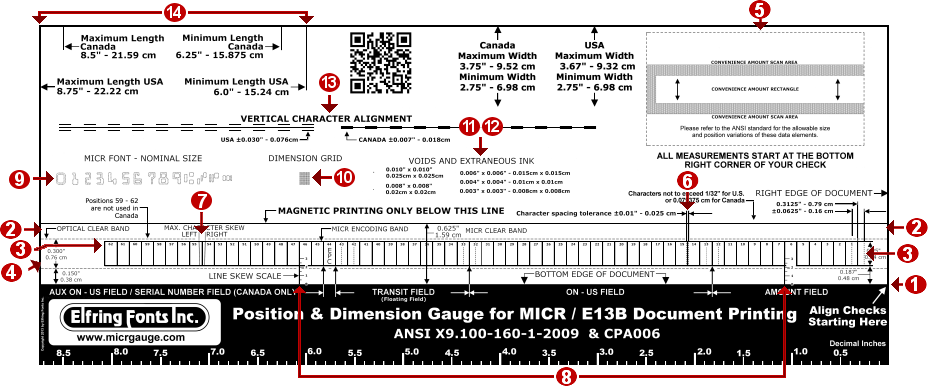
- 1. CHECK ALIGNMENT ALWAYS STARTS AT THE BOTTOM RIGHT CORNER OF THE CHECK:
- All MICR measurements are made from the bottom right corner of your check. Always use the gauge from the right side of your check! Measurements for items 2 - 7 are made by positioning the gauge over the check so that the check's bottom and right edge align with the black bottom area and right edge of the MICR gauge.
- 2. MICR CLEAR BAND:
- This area extends the full length of the check and 0.625 inches / 1.59 cm up from the bottom edge of the check. It must be free of all magnetic ink other than that used for the MICR / E13-B encoding information. Your gauge shows the complete extent of this area.
- 3. MICR ENCODING BAND:
- All MICR characters must be printed inside the encoding band located within the clear band. There are 62 character positions broken up into 4 fields: Aux ON-US / Serial Number, Transit, ON-US, and Amount. The Amount Field occupies positions 12 - 1, and the Transit Field must occupy positions #43 and stop at position #33 unless a floating field is required, ±0.0625 inches (0.16cm). Both the ON-US Field and Auxiliary ON-US Field are floating fields and may begin and end anywhere within their respective boundaries. The External Processing Code Field (EPC), is located between the transit field and the auxiliary on us field. The field location and content are supplied by your financial institution must be followed exactly.
Canada only: CPA 006 update June 30, 2006: The maximum number of characters in the serial number field is twelve (12) digits and two (2) On-Us symbols. This field must end at position 58. Canadian Requirements: positions 63, 64, & 65 must not be occupied. They are only used in the United States. - 4. OPTICAL CLEAR BAND:
- This area surrounds the MICR encoding band and extends the length of the check. It must be free of all background printing exceeding the optical specification of 0.30 Print Contrast Signal (PCS). Refer to the ANSI MICR specifications for related border information.
- 5. CONVENIENCE AMOUNT SCAN AREA (CASA):
- This rectangle includes the convenience amount clear area (CACA) and the convenience amount rectangle (CAR). Refer to the ANSI specifications for acceptable position and size variations. It is located in the upper right hand side of the MICR gauge.
- 6. HORIZONTAL CHARACTER TO CHARACTER SPACING:
- All MICR characters must have their right edges touching the right edges of the rectangular boxes they are located in. Each box is exactly 0.125 inches (0.317 cm) ±0.010" (0.025 cm), wide. The check may be shifted horizontally to positions 14 and 15 where possible spacing errors can be checked.
- 7. CHARACTER SKEW:
- Position the check horizontally under the gauge so that the character in question is in position 54 or 55. If the character is tilted so that it falls outside of either slanted lines, the vertical character skew specification of 1.5 degrees has been exceeded.
The following measurements require moving the document to different areas of the gauge.
- 8. LINE SKEW:
- Position the check so that the top edges of the MICR characters, excluding the Dash and On-Us symbols, touch the solid horizontal line that marks the top of the clear band. The bottom edge of the check will then bisect the vertical scales, marked in 1/2 degree increments, viewed in positions 6 and 46. The difference between readings of the two scales is the degree of line skew. Note the maximum line skew is 1.5 degrees.
- 9. MICR FONT SIZE:
- Position each outline character over the matching symbol on the MICR encoding line. If the MICR character fits between the inner and outer dashed outlines its size is acceptable.
- 10. DIMENSION GRID:
- This grid is comprised of 0.010; x 0.010 inch (0.025 x 0.025 cm) squares with spacing channels measuring 0.003 inches; (0.007 cm). MICR characters are made of 0.013 inch (0.033 cm) horizontal and vertical zones. To measure the stroke width of the character 0, align it under the grid. If a stroke covers a row of squares and its edges bisect both adjacent channels the width of that stroke is 0.010"; + 2 x 0.0015"; = 0.013"; (0.025 cm + 2 x 0.004 cm = 0.033 cm). If the edges just fill the squares the stroke is at the minimum permissible width. If the edges fill adjacent channels the stroke is at the maximum permissible width. To measure the overall dimension of any character, again using the 0 as an example , note it is 7 zones wide and 9 zones high, meeting the specifications for the width and height of a 0 as seen in the ANSI standard.
- 11. VOIDS:
- Position the check under the gauge so that the void is contained within one of the void / extraneous ink squares. Refer to the ANSI specification for allowable size variations.
- 12. EXTRANEOUS INK:
- Position the check under the gauge so the spot is contained within one of the void / extraneous ink squares. Refer to the ANSI specifications for allowable size variations.
- 13. VERTICAL CHARACTER TO CHARACTER ALIGNMENT:
- Position the check under the gauge so that the field to be measured is located over the correct country area (U.S. or Canada). The bottom edges of the characters must be within the dashed boundary lines above and below the solid base line.
- 14. DOCUMENT DIMENSIONS:
- The maximum and minimum length and width of a check are listed along the top left edge of the gauge showing the differences between the U.S. and Canada. The tolerance is ±0.062 inches (0.157 cm) except for the trailing edge where the dimensions listed are required minimums.